Welcome to Jeffrey Keefer’s Blog!

Jeffrey Keefer

Educational Researcher / PhD Student (Lancaster University, UK) in E-Research and Technology Enhanced Learning / Adjunct Instructor (NYU & Pace U) / Project Manager (Clinical Education) in New York City.

Interests in educational research influenced by interdisciplinarity, focused on digital identity, doctorateness and the postgraduate experience, threshold concepts and transformative learning in higher education, Internet research, networked learning, technology enhanced learning, distance education, adult and organizational learning, narrative inquiry, and actor-network theory.

My professional work is at JeffreyKeefer.com

View Jeffrey Keefer's profile on LinkedIn

Jeffrey’s Flickr

www.flickr.com
Jeffrey Keefer's photos More of Jeffrey Keefer's photos

Use Google Scholar for Full-Text Articles

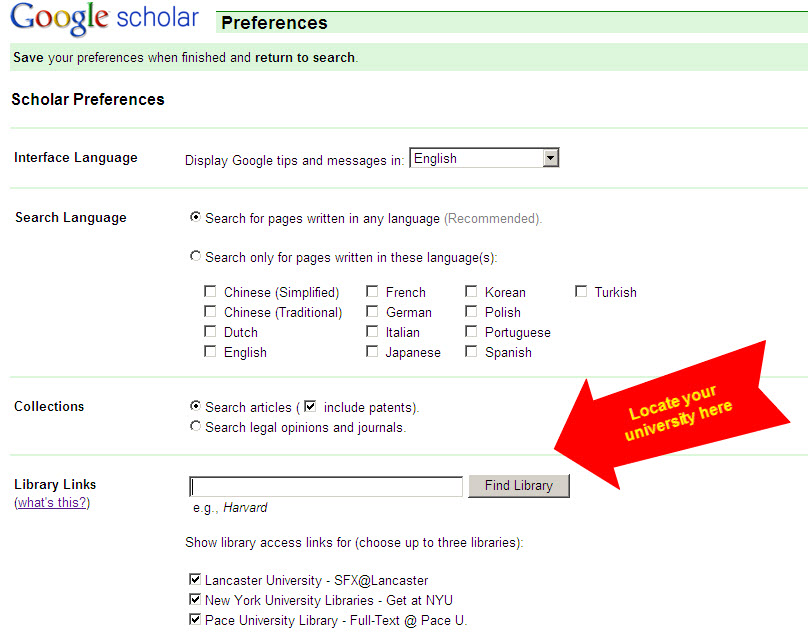
I just learned that I can enter my university-library specific information into Google Scholar Preferences and have it check to see if the articles that come up in the search results are available in the library. This has fundamentally shifted the way I use Google Scholar, which otherwise only identifies articles without helping you to access them.

The one limitation is that this works only if you have access to a university library, and if so you must be logged into it for remote database access or otherwise have direct access for the full-text accessibility to work. The full-text is based on the library access you already have, so if your institution does not have access to a particular database, you will not magically have access to it here, either. Alas, knowledge has to be kept safely locked away from the public (though I know these companies all have to generate revenue)!

NYU has a nice tutorial on using this that can easily be adapted to any other university database.


Similar Posts:

Leave a Reply


You can use these HTML tags

<a href="" title=""> <abbr title=""> <acronym title=""> <b> <blockquote cite=""> <cite> <code> <del datetime=""> <em> <i> <q cite=""> <strike> <strong>